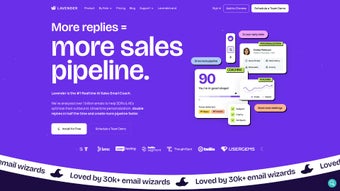

Download Lavender – AI Email Assistant for Sales Professionals
Overview: Boost Your Sales Emails with AI‑Powered Precision
Lavender is an AI‑driven email assistant built specifically for salespeople who want to write better, faster, and more persuasive emails. By leveraging large‑language‑model technology, Lavender analyses each draft in real‑time, offering contextual suggestions that improve tone, clarity, and relevance. The platform goes beyond simple grammar checks; it provides data‑backed insights such as optimal subject lines, call‑to‑action placement, and personalized language that resonates with the recipient’s industry or role. This level of intelligence helps sales professionals increase reply rates, shorten sales cycles, and ultimately close more deals.
The tool integrates directly into Gmail and Outlook, surfacing its recommendations within the native compose window so users never have to switch apps or copy‑paste content. Whether you’re a solo entrepreneur reaching out to prospects or part of a large sales team coordinating outreach campaigns, Lavender scales to meet the demand. Its intuitive dashboard lets managers monitor team performance, track email metrics, and identify coaching opportunities without invading privacy.
Privacy‑first architecture ensures that no ads are displayed and that user data is never sold to third parties. All email content stays encrypted during transmission and is stored only as long as needed for analytics. With a strong 4.7‑star rating on G2 and a growing community of satisfied users, Lavender stands out as a reliable, secure, and effective solution for anyone looking to sharpen their email outreach.
In addition to its core AI capabilities, Lavender offers a suite of collaboration tools that empower sales managers to assign templates, review drafts, and provide real‑time feedback. The platform’s analytics suite delivers actionable insights—open rates, reply rates, conversion metrics—allowing teams to iterate quickly and stay ahead of competitors. For sales professionals who value both efficiency and effectiveness, Lavender provides a single, cohesive environment that turns routine email drafting into a strategic advantage.
Key Features That Power Your Email Outreach
- Real‑time AI feedback: As you type, Lavender highlights weak sentences, suggests stronger verbs, and flags potential misunderstandings.
- Personalized suggestions: The engine pulls data from LinkedIn, company websites, and previous interactions to tailor language for each recipient.
- Subject line optimizer: Generates multiple subject line options and predicts open‑rate performance based on historical data.
- Call‑to‑action (CTA) enhancer: Recommends placement, wording, and urgency cues that increase click‑through rates.
- Performance analytics: Dashboard displays open rates, reply rates, and conversion metrics, enabling data‑driven adjustments.
- Team collaboration tools: Managers can assign templates, review drafts, and provide feedback directly within the platform.
- Seamless Gmail & Outlook integration: No browser extensions needed; Lavender works inside the native compose experience.
- Privacy‑focused architecture: End‑to‑end encryption, no ad serving, and compliance with GDPR and CCPA.
- Multi‑language support: Drafts can be written and optimized in English, Spanish, French, and German.
- Continuous learning: The AI model updates weekly, incorporating the latest sales best practices and email trends.
Each feature is designed to reduce friction in the email creation process while simultaneously improving effectiveness. For example, the real‑time AI feedback not only corrects spelling errors but also flags ambiguous phrases that could confuse a prospect. Meanwhile, the subject line optimizer leverages a proprietary dataset of millions of emails to predict which phrasing will achieve the highest open rates for a given industry segment. Together, these capabilities transform a routine sales email into a strategic communication piece that drives measurable results.
The analytics suite is equally powerful. Users can filter performance data by date range, campaign, or individual team member, revealing patterns such as which templates generate the most responses or which industries are most receptive to certain messaging styles. This insight fuels continuous improvement, allowing sales teams to iterate quickly and stay ahead of competitors. Whether you’re aiming to increase reply rates by 10 % or cut the time spent drafting emails in half, Lavender’s feature set provides the tools needed to achieve those goals.
Installation, Usage & Compatibility: Get Started in Minutes on Any Device
Setting up Lavender is straightforward, whether you’re on a Windows PC, a Mac, or a mobile device. Begin by visiting the official Lavender website and clicking the “Download” button that matches your platform. For Gmail users, a simple Chrome or Edge extension is offered; Outlook users receive a downloadable add‑in that integrates with both the desktop and web versions of Outlook. After the installer runs, you’ll be prompted to sign in with your work email address. Lavender uses OAuth authentication, so you never need to store passwords locally.
Once authenticated, the AI assistant appears as a sidebar within your compose window. The first time you open a new email, Lavender runs a brief calibration, analyzing a handful of recent messages to understand your typical tone and style. This calibration step takes less than a minute but dramatically improves the relevance of its suggestions.
From there, you can start typing as usual. As you write, Lavender’s suggestions pop up in real‑time, highlighted in blue. Clicking a suggestion inserts the recommended phrasing, while an “Ignore” button lets you keep your original wording.
For teams, administrators can provision licenses from the Lavender dashboard, assign users to groups, and upload shared templates. The dashboard also offers a “Coaching Mode” where managers can review drafts before they’re sent, add comments, and approve final versions. This feature is especially valuable for onboarding new sales reps, ensuring brand consistency, and maintaining compliance with industry regulations.
Lavender is built to be platform‑agnostic, supporting the most widely used email clients and operating systems. Desktop users benefit from native Gmail extensions (Chrome, Edge, Firefox, Safari) and Outlook add‑ins for Windows 10+ and macOS 11+. Mobile users can download companion apps for iOS and Android, which sync with the cloud‑based dashboard and provide quick access to template libraries, performance analytics, and on‑the‑go AI recommendations for short replies. System requirements are modest: at least 4 GB of RAM, 200 MB of free disk space, and a modern browser that supports JavaScript ES6.
Updating the software is handled automatically. When a new AI model or feature is released, Lavender notifies you within the application and applies the update silently in the background. This ensures you always have the latest improvements without needing to manually download patches. If you ever need to uninstall, the process follows the standard OS procedure—simply remove the application from your programs list, and all associated data is securely deleted.
Pros and Cons: A Balanced Look at Lavender
Pros
- Real‑time AI suggestions improve email quality without slowing down workflow.
- Deep integration with Gmail and Outlook eliminates the need for separate drafting tools.
- Personalized language recommendations based on recipient data increase relevance.
- Robust analytics give clear insight into open, reply, and conversion rates.
- Team features such as shared templates and manager coaching streamline collaboration.
- Privacy‑first design with end‑to‑end encryption and no ad‑supported model.
- Continuous AI model updates keep the tool aligned with the latest sales best practices.
- Multi‑language support broadens usability for international sales teams.
- Self‑hosted option available for enterprises with strict data residency requirements.
- Free tier provides basic grammar and tone suggestions for users who want to test the waters.
Cons
- Full feature set requires a paid subscription; the free tier is limited to basic suggestions.
- Initial calibration may feel intrusive for users who prefer a completely hands‑off approach.
- Advanced analytics dashboards are only accessible to admin users, limiting individual insights.
- Mobile apps, while functional, do not yet offer the same depth of real‑time feedback as desktop.
- Outlook integration can be slightly slower on older versions of the Office suite.
- Self‑hosted deployment adds complexity and may require additional IT resources.
Overall, the advantages of Lavender far outweigh its drawbacks for most sales professionals. The ability to craft data‑driven, personalized emails in seconds translates directly into higher engagement metrics and shorter sales cycles. While the subscription cost may be a consideration for very small teams, the ROI demonstrated by improved reply rates typically justifies the investment.
Frequently Asked Questions
Is Lavender compatible with both personal and corporate email accounts?
Yes. Lavender works with any Gmail or Outlook account, whether it’s a personal @gmail.com address or a corporate domain managed through G Suite or Microsoft 365. The integration simply requires OAuth permission to read and write draft content.
How does Lavender handle data privacy and security?
Lavender employs end‑to‑end encryption for all data in transit and stores email content only for the duration needed to generate analytics. The platform does not display ads, sell data, or use email content for any purpose other than improving the AI model. It complies with GDPR, CCPA, and other major privacy regulations.
Can I try Lavender before committing to a paid plan?
A free tier is available that provides basic grammar and tone suggestions. For full access to personalized recommendations, analytics, and team collaboration tools, you can start a 14‑day trial of the Premium plan without entering payment details.
Does Lavender work with email templates I already have?
Absolutely. Lavender can import existing templates from Gmail or Outlook and then enhance them with AI suggestions. You can also create new templates directly within the Lavender dashboard and share them across your team.
What kind of support does Lavender offer to users?
Lavender provides 24/7 email support, a live chat option for premium customers, and an extensive knowledge base with tutorials, webinars, and best‑practice guides. Dedicated account managers are available for enterprise plans.
Conclusion: Elevate Your Sales Outreach with Lavender Today
In today’s hyper‑competitive market, the ability to craft compelling, personalized emails quickly can be the difference between a closed deal and a missed opportunity. Lavender delivers precisely that edge by blending sophisticated AI with seamless integration into the tools sales professionals already use. Its real‑time feedback, subject line optimization, and performance analytics empower users to write emails that not only look professional but also drive measurable results.
Whether you are a solo entrepreneur looking to increase reply rates or a sales leader tasked with scaling outreach across a global team, Lavender’s feature set adapts to your needs. The platform’s privacy‑first approach ensures that your data remains secure, while the continuous learning loop guarantees that you stay ahead of evolving sales tactics. Although a subscription is required for the most advanced capabilities, the ROI demonstrated by higher engagement metrics typically outweighs the cost.
Ready to transform your email workflow into a strategic advantage? Download Lavender now and experience the power of AI‑enhanced productivity. Your inbox will never be the same—and your sales pipeline will thank you.



.png)



